
How I Built This Blog
I needed:
- Complete control of the frontend
- WordPress writing experience on the backend
- Server-side rendering for the robots
- Fun experience for the humans
Hello World
Why am I doing this? It’s 2026. We’re on the cusp of the AI singularity. Coding has largely been solved, knowledge is now worthless, and I only have a few months to escape the permanent underclass (or so I keep hearing from people who have quietly removed NFTs from their Twitter profile in recent years). Why even bother starting a tech blog in this environment?
In short, I have things to say. Advice to impart. Questions to ask. Side projects to demo. And I need a walled-garden in which to do it – a humble corner of the Internet where I can pontificate in peace.
Most of the engineers I admire have a similar space online, and I have benefited enormously from their efforts over the course of my career. I couldn’t even guess how many times Nadia Makarevich at DeveloperWay and Dominik at TkDodo helped me out of a sticky frontend situation. Neal Agarwal and Bas Waijers give me hope for humanity, and my friends Fawaz Shah and Itay Dafna have been cooking up interesting projects recently. I’d encourage anyone with expertise in any field to do the same. You won’t know the value of your knowledge until you share it.
So, in the spirit of sharing something that someone, somewhere might find useful: hello world.
This is how I built this blog.
How It’s Made
I’ve tried launching something like this before. My first attempts ran the usual gauntlet of no-code website builders like Squarespace or WordPress, but I found they didn’t give me enough control over how the site behaved. This is supposed to be a place where I boast shamelessly about my engineering prowess, after all.
But it was hard to walk away from the writing experience in a platform like WordPress. I like that I can just type and click a button to publish a new post. I need a machine that I can dump my stream of consciousness into. Something that will pipe these organic hot-takes right through the Internet tubes and into your eyeballs. Spell checking, database storage, and API accessibility included out-of-the-box, please and thank you.
I also want to give the content its best chance to be crawled by search engines and AI agents, so Server-Side Rendering (SSR) is a must. But the site is ultimately built for humans, so it should have some charm to complement the mostly-static content.
The Problem
In summary, I needed:
- Complete control of the frontend
- WordPress writing experience on the backend
- Server-side rendering for the robots
- Fun experience for the humans
The Solution
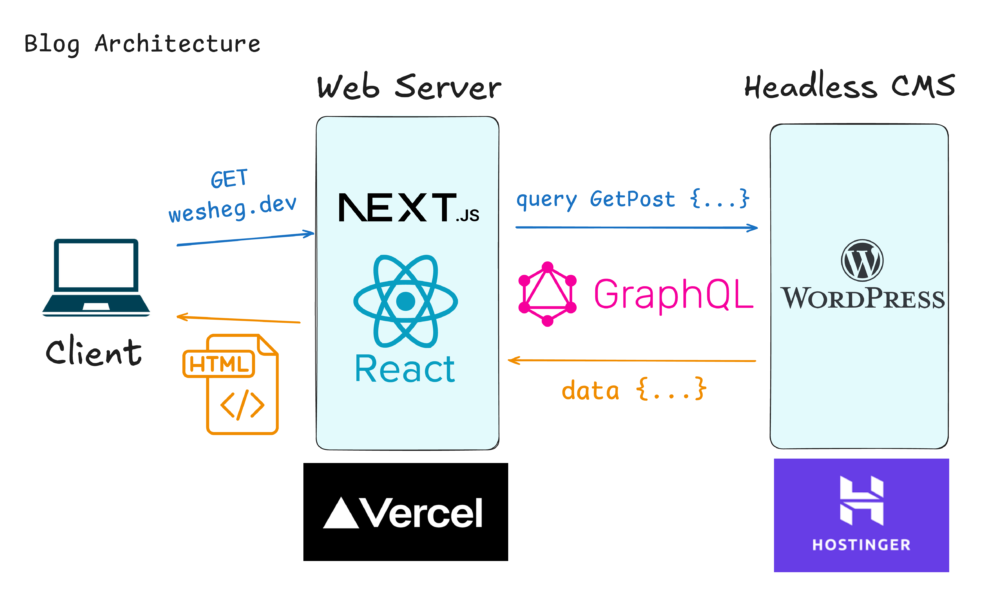
Behold! The Excalidraw architecture diagram – the last bastion of system design before your half-baked ideas meet a cold splash of reality.
The solution is to separate the content from the presentation layer.
In a traditional WordPress setup, WordPress is storing your posts in a database, retrieving them via PHP, and generating your site’s HTML via templates that you create. But if you want, you can remove the presentation layer and use WordPress solely as a content storage and retrieval system – an arrangement known as a “Headless” Content Management System (CMS).
In this design, I’m hosting two different web applications. I have a NextJS app deployed to Vercel, and a WordPress instance running on Hostinger. They communicate with each other via GraphQL queries. When your browser loaded this page, NextJS sent a GraphQL query to the headless WordPress instance, asking for this blog post. NextJS waited for the response, and then rendered HTML on the server before sending it to you.
This simple (but effective) architecture gives me everything I want. The initial setup was a little tedious, but it means that publishing new posts is pretty easy, since I still have access to all of WordPress’ authoring tools on the backend.